





GPT-OSS Swallow
GPT-OSS SwallowはOpenAI GPT-OSSの日本語能力と思考力を強化した推論型大規模言語モデル (20B, 120B) です。モデルのパラメータ(重み)はApache 2.0ライセンスで公開されていますので、商用・研究・個人的用途で無料かつ自由にダウンロード、カスタマイズ、ホスティングできます。GPT-OSS SwallowはOpenAI社のGPT-OSSをベースに、東京科学大学情報理工学院の岡崎研究室と横田研究室、国立研究開発法人産業技術総合研究所の研究チームで開発されました。


本モデルはApache 2.0ライセンスで公開されているため、商用・研究・個人のいずれの用途でも無料でカスタマイズやホスティングが可能です。高い日本語処理能力を備えつつ、ローカル環境で動作させることができるため、秘匿性の高いデータを扱うセキュアなAI基盤の構築に最適なモデルといえます。
Ollama
公開されているモデルはsafetensors形式のため、Ollamaで利用するのは少々厄介です。
Ollamaで利用する方法を紹介します
モデルダウンロード
以下のURLからモデルをダウンロードしてください
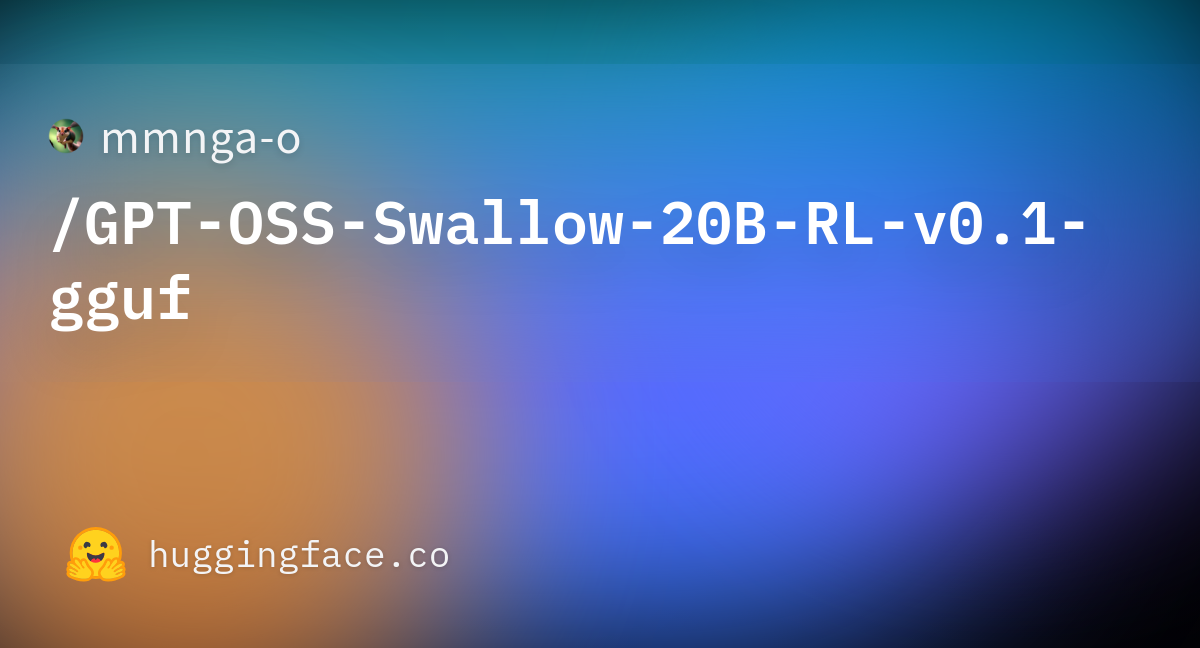
今回はGPT-OSS Swallowをggufに変換されているモデルを利用します
Modelfile
Ollamaで利用できるように新規テキストファイルを作成して、ファイル名を「Modelfile」にします
テキストファイル内に以下の内容を記載してください
# ダウンロードしたGGUFファイル名を指定
FROM ./GPT-OSS-Swallow-20B-SFT-v0.1-Q4_0.gguf

TEMPLATE """<|start|>system<|message|>You are ChatGPT, a large language model trained by OpenAI.
Knowledge cutoff: 2024-06
Current date: {{ currentDate }}
{{- if and .IsThinkSet .Think (ne .ThinkLevel "") }}

Reasoning: {{ .ThinkLevel }}
{{- else if or (not .IsThinkSet) (and .IsThinkSet .Think) }}

Reasoning: medium
{{- end }}

{{- $hasNonBuiltinTools := false }}
{{- if .Tools -}}
{{- $hasBrowserSearch := false }}
{{- $hasBrowserOpen := false }}
{{- $hasBrowserFind := false }}
{{- $hasPython := false }}
  {{- range .Tools }}
    {{- if eq .Function.Name "browser.search" -}}{{- $hasBrowserSearch = true -}}
    {{- else if eq .Function.Name "browser.open" -}}{{- $hasBrowserOpen = true -}}
    {{- else if eq .Function.Name "browser.find" -}}{{- $hasBrowserFind = true -}}
    {{- else if eq .Function.Name "python" -}}{{- $hasPython = true -}}
    {{- else }}{{ $hasNonBuiltinTools = true -}}
    {{- end }}
  {{- end }}
{{- if or $hasBrowserSearch $hasBrowserOpen $hasBrowserFind $hasPython }}

# Tools
{{- if or $hasBrowserSearch $hasBrowserOpen $hasBrowserFind }}

## browser

// Tool for browsing.
// The `cursor` appears in brackets before each browsing display: `[{cursor}]`.
// Cite information from the tool using the following format:
// `【{cursor}†L{line_start}(-L{line_end})?】`, for example: `【6†L9-L11】` or `【8†L3】`.
// Do not quote more than 10 words directly from the tool output.
// sources=web (default: web)
namespace browser {
{{- if $hasBrowserSearch }}

// Searches for information related to `query` and displays `topn` results.
type search = (_: {
query: string,
topn?: number, // default: 10
source?: string,
}) => any;
{{- end }}
{{- if $hasBrowserOpen }}

// Opens the link `id` from the page indicated by `cursor` starting at line number `loc`, showing `num_lines` lines.
// Valid link ids are displayed with the formatting: `【{id}†.*】`.
// If `cursor` is not provided, the most recent page is implied.
// If `id` is a string, it is treated as a fully qualified URL associated with `source`.
// If `loc` is not provided, the viewport will be positioned at the beginning of the document or centered on the most relevant passage, if available.
// Use this function without `id` to scroll to a new location of an opened page.
type open = (_: {
id?: number | string, // default: -1
cursor?: number, // default: -1
loc?: number, // default: -1
num_lines?: number, // default: -1
view_source?: boolean, // default: false
source?: string,
}) => any;
{{- end }}
{{- if $hasBrowserFind }}

// Finds exact matches of `pattern` in the current page, or the page given by `cursor`.
type find = (_: {
pattern: string,
cursor?: number, // default: -1
}) => any;
{{- end }}

} // namespace browser
{{- end }}{{/* end if has browser tools */}}
{{- if $hasPython }}

## python

Use this tool to execute Python code in your chain of thought. The code will not be shown to the user. This tool should be used for internal reasoning, but not for code that is intended to be visible to the user (e.g. when creating plots, tables, or files).

When you send a message containing Python code to python, it will be executed in a stateful Jupyter notebook environment. python will respond with the output of the execution or time out after 120.0 seconds. The drive at '/mnt/data' can be used to save and persist user files. Internet access for this session is UNKNOWN. Depends on the cluster.
{{- end }}{{/* end if hasPython */}}
{{- end }}{{/* end if has any built-in tools */}}
{{- end }}{{/* end if .Tools */}}

# Valid channels: analysis, commentary, final. Channel must be included for every message.{{ if $hasNonBuiltinTools }}
Calls to these tools must go to the commentary channel: 'functions'.
{{- end -}}<|end|>{{/* end of system */ -}}
{{- if or $hasNonBuiltinTools .System -}}
<|start|>developer<|message|>{{- if $hasNonBuiltinTools }}# Tools

## functions

namespace functions {
{{- range .Tools }}
{{- if not (or (eq .Function.Name "browser.search") (eq .Function.Name "browser.open") (eq .Function.Name "browser.find") (eq .Function.Name "python")) }}
{{if .Function.Description }}
// {{ .Function.Description }}
{{- end }}
{{- if and .Function.Parameters.Properties (gt (len .Function.Parameters.Properties) 0) }}
type {{ .Function.Name }} = (_: {
{{- range $name, $prop := .Function.Parameters.Properties }}
{{- if $prop.Description }}
  // {{ $prop.Description }}
{{- end }}
  {{ $name }}: {{ $prop | toTypeScriptType }},
{{- end }}
}) => any;
{{- else }}
type {{ .Function.Name }} = () => any;
{{- end }}
{{- end }}{{/* end if not browser tool */}}
{{- end }}{{/* end of range .Tools */}}

} // namespace functions
{{- end }}{{/* end if hasNonBuiltinTools */}}
{{- if .System}}

# Instructions

{{ .System }}
{{- end -}}
<|end|>
{{- end -}}
{{- /* Find the index of the last user message */ -}}
{{- $lastUserIdx := -1 }}
{{- $prefillingContent := false }}
{{- $prefillingThinkingOnly := false }}
{{- range $i, $msg := .Messages }}
  {{- $last := eq (len (slice $.Messages $i)) 1 -}}
  {{- if eq $msg.Role "user" }}
    {{- $lastUserIdx = $i }}
  {{- end -}}
  {{- if and $last (eq $msg.Role "assistant") (gt (len $msg.Content) 0) }}
    {{- $prefillingContent = true }}
  {{- else if and $last (eq $msg.Role "assistant") (gt (len $msg.Thinking) 0) }}
    {{- $prefillingThinkingOnly = true }}
  {{- end }}
{{- end -}}
{{- /* Now render messages */ -}}
{{- range $i, $msg := .Messages }}
  {{- $last := eq (len (slice $.Messages $i)) 1 -}}
  {{- if (ne $msg.Role "system") -}}
    {{- if eq $msg.Role "tool" -}}
      {{- if or (eq $msg.ToolName "python") (eq $msg.ToolName "browser.search") (eq $msg.ToolName "browser.open") (eq $msg.ToolName "browser.find") -}}
        <|start|>{{ $msg.ToolName }} to=assistant<|message|>{{ $msg.Content }}<|end|>
      {{- else -}}
        <|start|>functions.{{ $msg.ToolName }} to=assistant<|message|>{{ $msg.Content }}<|end|>
      {{- end -}}
    {{- else if eq $msg.Role "assistant" -}}
      {{- if and $msg.Thinking (gt $i $lastUserIdx) -}}{{- /* Show thinking only after last user message */ -}}
      <|start|>assistant<|channel|>analysis<|message|>{{ $msg.Thinking }}{{- if not $prefillingThinkingOnly -}}<|end|>{{- end -}}
      {{- end -}}
      {{- if gt (len $msg.Content) 0 -}}
        <|start|>assistant<|channel|>final<|message|>{{ $msg.Content }}{{- if not $prefillingContent -}}<|end|>{{- end -}}
      {{- end -}}
      {{- if gt (len $msg.ToolCalls) 0 -}}
        {{- range $j, $toolCall := $msg.ToolCalls -}}
          {{- $isBuiltin := or (eq $toolCall.Function.Name "python") (eq $toolCall.Function.Name "browser.search") (eq $toolCall.Function.Name "browser.open") (eq $toolCall.Function.Name "browser.find") -}}
          <|start|>assistant<|channel|>{{ if $isBuiltin }}analysis{{ else }}commentary{{ end }} to={{ if not $isBuiltin}}functions.{{end}}{{ $toolCall.Function.Name }} <|constrain|>json<|message|>{{ $toolCall.Function.Arguments }}<|call|>
        {{- end -}}
      {{- end -}}
    {{- else if eq $msg.Role "user" -}}
      <|start|>{{ $msg.Role }}<|message|>{{ $msg.Content }}<|end|>
    {{- end }}
  {{- else }}
  {{- end }}
{{- end -}}
{{- if not (or $prefillingContent $prefillingThinkingOnly) -}}
<|start|>assistant
{{- end -}}"""
PARAMETER temperature 0.6
PARAMETER top_p 0.95
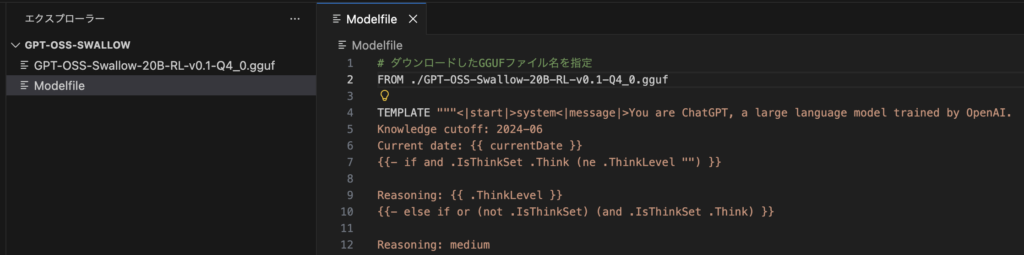
ファイル構成
以下のように同じフォルダ内に「GPT-OSS-Swallow-20B-RL-v0.1-Q4_0.gguf」と「Modelfile」を入れます
モデル登録
Ollamaにモデルを登録する場合、以下のコマンドを実行します
ollama create gpt-oss-swallow -f Modelfileコマンドを実行すると以下の通りになると思います
$ ollama create gpt-oss-swallow -f Modelfile
gathering model components
copying file sha256:01d585c760cedf6c31c1be36a8e6395eeecaf14c9f8e978db962b68604697295 100%
parsing GGUF
using existing layer sha256:01d585c760cedf6c31c1be36a8e6395eeecaf14c9f8e978db962b68604697295
creating new layer sha256:fa6710a93d78da62641e192361344be7a8c0a1c3737f139cf89f20ce1626b99c
writing manifest
success
Ollamaのモデルリストを確認すると正しく登録されていることがわかります
$ ollama list
NAME                      ID              SIZE      MODIFIED
gpt-oss-swallow:latest    9ddd1e3f3f06    12 GB     2 minutes ago
モデル実行
以下のコマンドで実行します
ollama run gpt-oss-swallow以下は実行結果です。
$ ollama run gpt-oss-swallow
>>> こんにちは。
Thinking...
We need to respond in Japanese, as system says "日本語で回答してください". So reply in Japanese.
...done thinking.

こんにちは!どのようなお手伝えがありますか?
コメント